
If you run royalties, you know where most of your time goes every period. It’s not the calculation, or even payment processing. It’s the royalty data entry, cleanup, and preparation required to get everything ready to run. Sales data needs to be imported, mapped, and reviewed. Catalog metadata needs to be cleaned and uploaded. Contracts need to be interpreted and configured in your royalty system. Costs need categorizing and mapping. And it all starts over next period, whatever shape the data arrives in.
For royalty admins, much of this work has been manual for decades. The “industry standard” systems are inflexible, and they can’t handle the volume of data music generates today. They offer little to no automation or error catching.
Our team of music industry experts includes royalty admins who have done this work for years. We know how complex data management gets, and the waterfall effect a single error can cause. That’s why we build tools for the real problems of music royalty operations, like data ingestion and management.
Introducing Royalty Data Automation: Data Importer
The Data Importer takes on the problem of data ingestion. No reformatting files, no manual entry, no broken formulas. Just drag and drop a file and let Toni, our built-in AI assistant, take it from there.
The Data Importer lets Tone users upload their data (PDF, CSV, or XLS) and process it with Tone’s AI assistant. Within seconds of uploading a file, Tone prompts you to Import with Toni. That opens Toni’s chat window. Toni reviews your data and explains the logic it’s using. It asks clarifying questions, makes recommendations, and walks you through next steps.
Unlike royalty systems that require data to fit a rigid import template, Tone’s Data Importer adapts to the files you already have. You can upload data in its existing format and tell Toni how it should map, transform, and import into Tone. That means less time restructuring spreadsheets and fewer failed imports caused by formatting or validation issues.
The result: work that once took hours of manual entry now happens in a conversation.
How Tone’s Data Importer Works:
- Navigate to the Library and click Import
- Click Upload file(s) and select the files you want to bring in
- Once the file is uploaded, click Import with Toni
- Toni inspects the file, identifies the type of data it contains, and suggests how to proceed
- You confirm both the data type and the next step
- Toni outlines the proposed changes, and you choose to Approve or Reject them
Toni does more than import. It can transform your data on the way in:
- Convert dates and track durations into the required format
- Check for duplicate ISRCs and other conflicting data
- Concatenate values from multiple columns
- Add, subtract, multiply, or divide numeric values
- Compare incoming data against existing records
Uploading catalog metadata? Toni can compare the file against your existing catalog and import only the new tracks and releases.
Importing a cost file? Toni can combine fields like Vendor, Description, and Project to create the cost Description used in Tone—without requiring you to create a new concatenated column in Excel first.
At every step, you’re driving. Toni does the work in the background and checks in before anything changes.
How Much Royalty Data Entry Time Does Toni Save?
The numbers speak for themselves. Across the workflows Toni supports, Tone users are seeing:
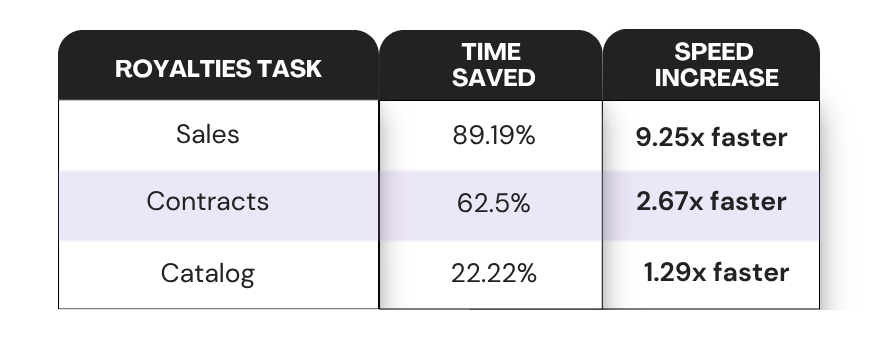
Contracts get an added layer of confidence. Toni generates a summary of the agreement, and each term links back to the clause it came from. You can check every term directly against the source document.
But the real impact isn’t just the hours. It’s what those hours are spent on. Data entry and clean-up has historically been the bulk of a royalty admin’s job. Giving that time back doesn’t just speed up statement generation. It changes the day-to-day operations of royalty management.
One new Tone client put it simply:
“As a new user, having the assistant Toni has been super helpful. I wanted to import our catalog from Audio Salad, so I just dropped a CSV into Tone and it imported everything. It worked great.”
Why No Other Royalty Platform Automates Data Entry
Curve became the standard for a reason. It fixed many of the workarounds older systems forced on music royalty teams. But the industry kept moving, and Curve hasn’t kept up.
No other royalty platform offers data entry automation at this level. None has an assistant built into the app that sees your catalog, contracts, and costs, and how they connect.
That matters, because a generic AI chatbot or LLM like ChatGPT or Claude can only answer questions. Toni works with your actual account data and does the work, with your approval at every step.
Tone keeps evolving because your catalog does. Our goal is simple: you never outgrow us and switch systems out of necessity.
Built with trust in mind
Automation only works if you can trust it, especially when it’s touching financial data. That’s why Toni is designed around two core principles:
- Toni never changes your data without permission. You review every proposed change twice — first approving it in chat, then reviewing the pending draft edit before it’s saved.
- Your data stays yours. Anything you import through Tone’s AI tools is private to your Tone account. It’s never used to train other models, and it can’t be accessed by anyone without permission to view it within your company. Additionally, your conversations with Toni are private within your individual account, not shared across your team.
Who Royalty Data Entry Automation Helps Most
Royalty teams managing growing catalogs. More releases mean more sales files, more contracts, more costs to reconcile every period. The manual approach that worked at 50 tracks breaks down at 5,000. The Data Importer scales with the catalog instead of adding headcount to keep up with it.
New users still getting familiar with the platform. You don’t need to know where every field belongs before you start. Toni tells you what it’s looking at and asks before it acts, so you learn the platform by using it, not by reading documentation first.
Teams working against a tight statement deadline. A distributor report lands the day before statements go out, and there’s no time to reformat it by hand. Drop it in, let Toni process it, and confirm the changes. The deadline doesn’t move, but the time it takes to get there does.
Try it today
The Data Importer is live now, in beta, for every active company account — no extra setup required.