
Welcome to the second edition of “In Tune” — a monthly look at what’s new in your workspace. This month, Toni takes on more of the job from start to finish, your sales settings get a home of their own, and your artists now have a place in the Library, images and all.
Toni sees the job through
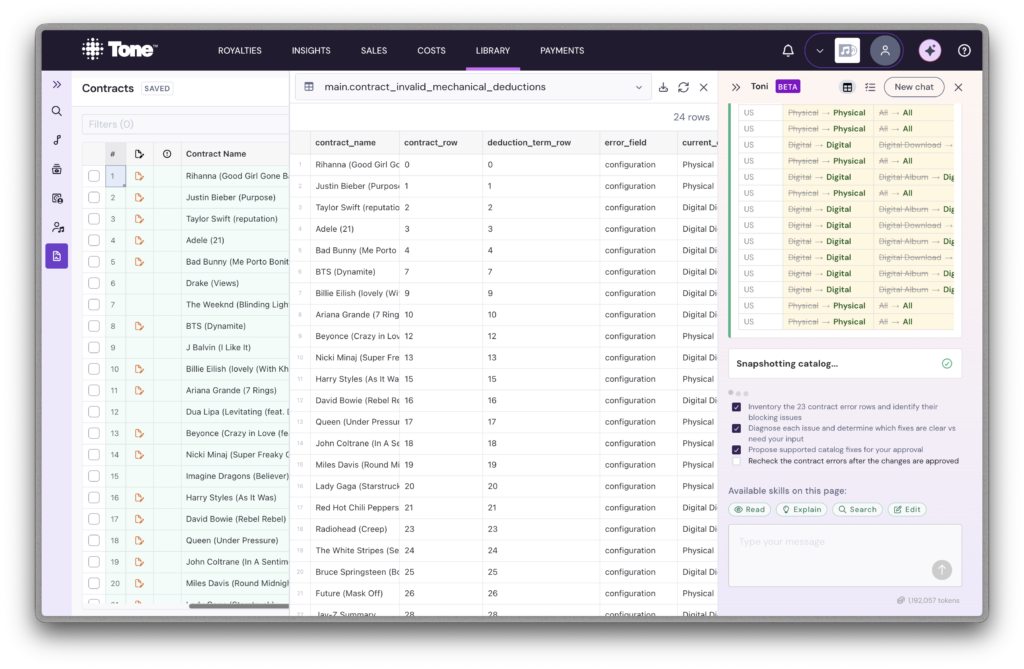
Most of the work you hand Toni has more than one step, and it used to stop halfway to check in. Now Toni writes a to-do list for the job, shows it above the chat, and works through it to the end, pausing only where it needs your approval or where you asked it to check with you first.
If your team does the same job every month, you can save it as a workflow. Once a job goes the way you want, ask Toni to save it (or write one yourself in the Workflows panel), and next time just ask for it by name. Workflows are shared with everyone on your team.
Toni is also quicker and more careful in the sales file template builder. Ask it to map a sheet and it’ll put up a proposal sooner, suggest rules to skip totals rows and repeated headers, and flag any rule it had to guess with a warning icon that tells you why. When you import a contract PDF, it now asks which contract group the contract belongs to before building anything. As always, Toni won’t make changes without your approval.
One place to manage your sales settings
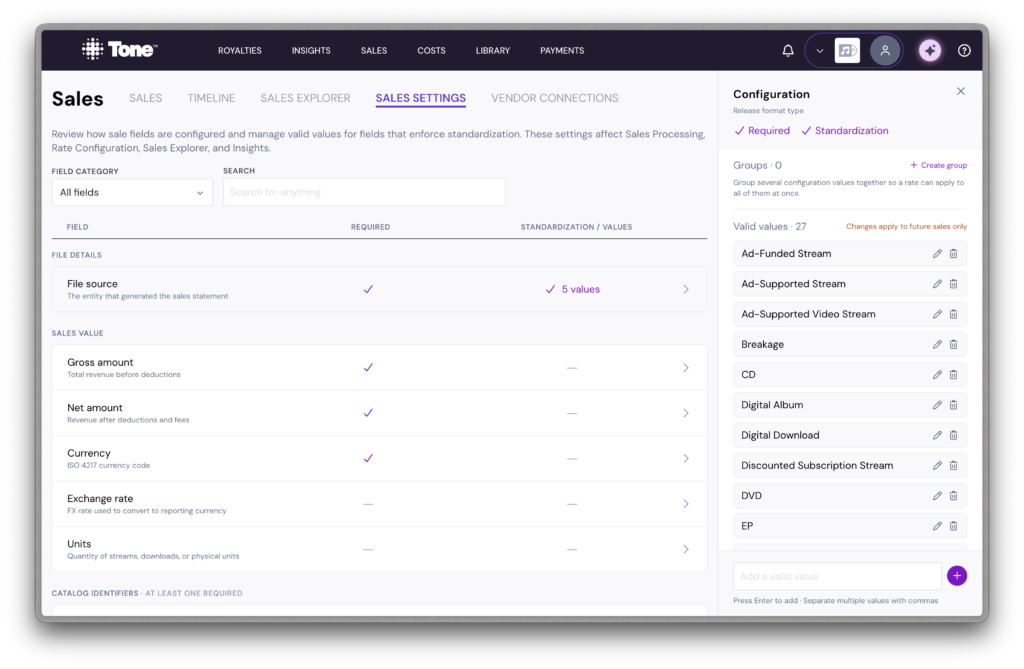
The values your sales files and contract rates depend on (distribution channels, territories, file sources and their groups) used to be edited in whatever dropdown you happened to be in. Now they live together in Sales Settings, a tab in Sales, and the contract rate builder links straight to it.
Renames are safer too. Because these values are matched by name, renaming one used to quietly break any release or rate still using the old name. Tone now stops a rename that would leave something behind, so you can tidy your lists without creating new errors.
To make changes in Sales Settings you’ll need permission to manage both sales and your Library; everyone else can still pick from the lists as before.
Your artists get a home in the Library
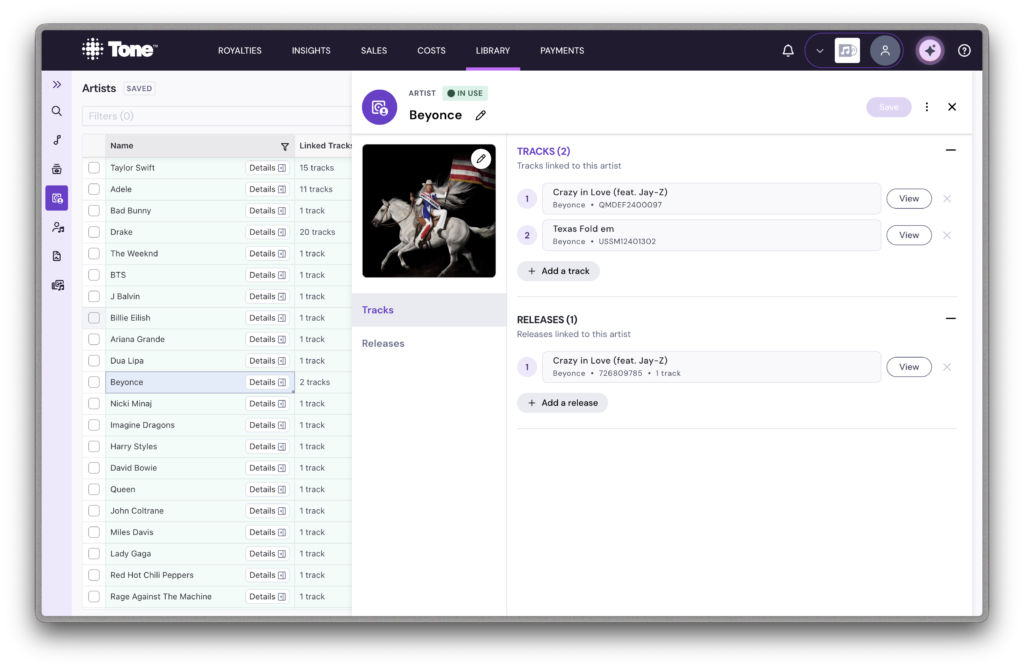
Artists used to be just a name typed onto a track or release. Now they have their own Artists section in the Library: every artist in your catalog in one list, linked to the tracks and releases they appear on.
Open an artist to see everything they’re linked to, jump straight to any track or release with View, and unlink one with the ✕. Each track and release still has its main artist, and now you can add the other artists who appear on it too.
Your catalog looks the part as well. Artist images and release cover art now show in the Library’s detail panels. Upload your own, replace or remove one from Edit image, or use Find artist image and Find cover art to pick from the images available on streaming services. If you remove an image, it stays removed.
Did you know?
Your Library opens faster, especially if your catalog is large. Tone now starts showing each Library sheet as soon as its data arrives, instead of waiting for everything to load, and the checks it runs on your catalog after it opens take about half the time they used to. The bigger your catalog, the more you’ll notice it.
Tip: If you’ve been keeping a Library tab open all day to avoid reloading it, give it a fresh load and see the difference.
Use Tone like the Tone Team

“Every month, I get an updated catalog export from the same distributor, and it’s always the same cleanup process: standardizing track versions, checking ISRCs against what’s already in Tone to identify new tracks, etc. I used to do all of this in spreadsheets, but now I’ve created a Toni workflow that follows those same steps. I just upload the file as-is, run the workflow, and review the results.” – Kaitlyn Russell, Manager of Royalty Services
Other highlights
Features we added:
- Beta: A Fix metadata page, linked from Fetch Metadata in the Library, that finds releases whose track count doesn’t match Spotify, Apple Music, Deezer or MusicBrainz and lets you add the missing tracks as drafts
- A contract group filter on closed royalty periods
- For publishers: mechanical contract terms can now be limited to specific sales file sources
Features we changed:
- ✕ now means remove (unlink) and the trash can means delete, consistently across the app
- Filter and settings side panels can now be resized, the same way as Toni
- The Library rail stays visible next to open detail panels
- Headline numbers on Insights now match the style of Sales Explorer, and monthly Sales Explorer charts show cleaner date labels
- The Import page’s Queued tab bulk actions are simpler: move finished files to Imported, or delete them
- Saving a transaction mapped to a draft contract now tells you why it can’t be saved, instead of silently disabling Save
Bugs we fixed:
- The Library getting stuck on “Bringing up your data…” for team members without Library access (it’s now hidden for them)
- Sales lines with a semicolon in their identifier staying unmapped after you added an alias
- Royalty periods failing to process with a “did not reconcile” error when a linked reserve release was dated outside the period
- New payee users showing as “Emailed” when no invite had been sent, or losing the email you typed after a refresh
- Costs page filters not being kept in the page link, so a shared or reloaded link lost them
- Choosing an option in some dropdowns closing the side panel it was in