
Welcome to the third edition of “In Tune” — a monthly look at what’s new in your workspace. This month, Toni takes on more of your importing, every record in your Library keeps its own history, and contract rates can now change on a date.
Import multiple files together with Toni
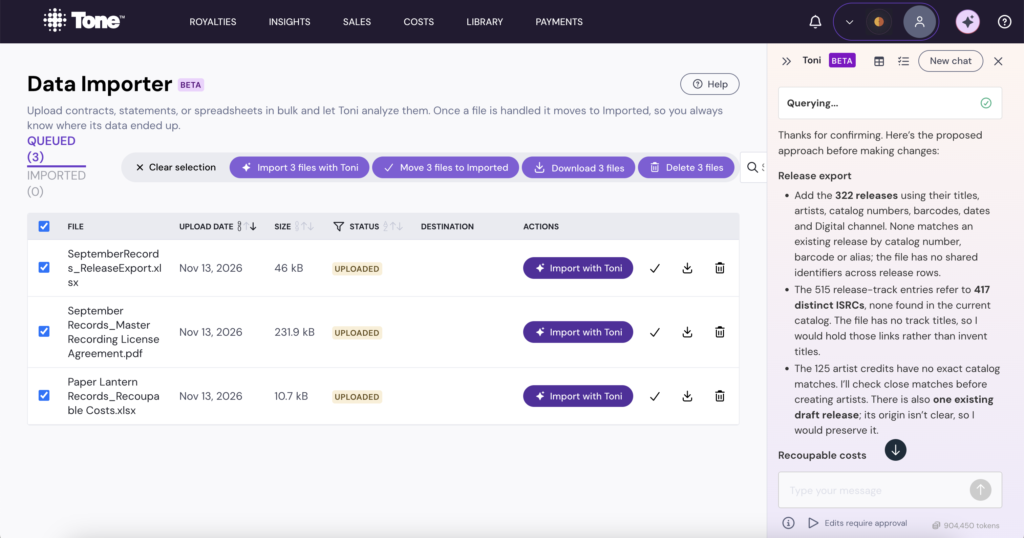
Getting a catalog, a set of contracts, and a pile of invoices into Tone used to mean working through them one file at a time. Now you can select several files on the Import page and send them all to Toni at once with Import with Toni.
Toni reads each file and tells you what it holds: a release export with its track lists, a contract PDF, a batch of invoices. Toni compares the uploaded files to your current library and presents an import plan for approval.
Toni now supports importing costs from invoices, attaching each invoice file to the corresponding cost entry. Plus, if you’d rather not approve every change along the way, you can now turn on auto edit mode in Toni’s chat and review Toni’s drafts when it’s done.
Import with Toni is available to everyone on your team who can manage your Library.
See who changed what, on any record
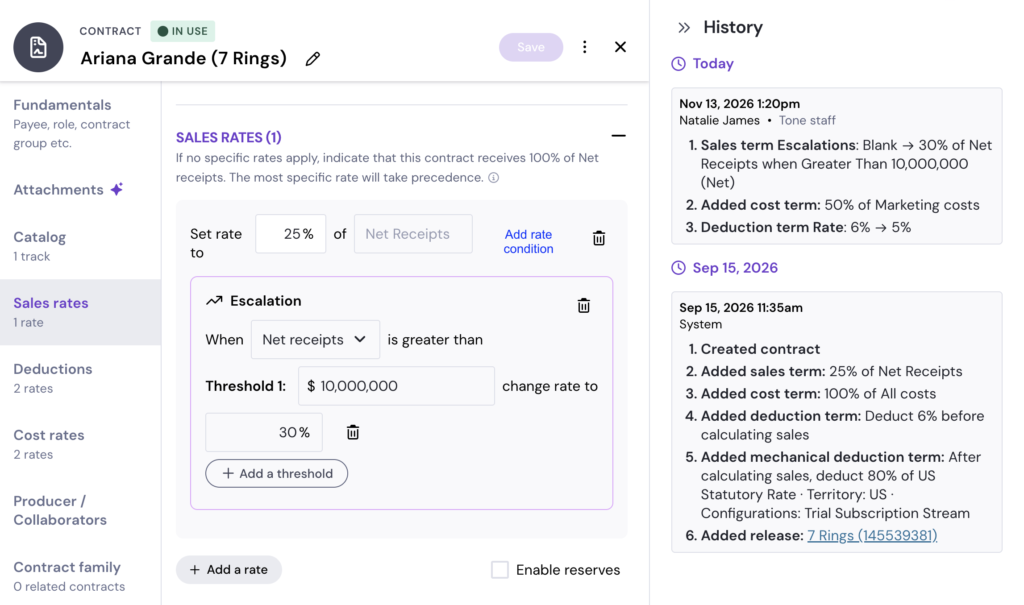
When a rate looks different from last month, the first question is who changed it, and when. Now every record in your Library can answer that itself.
Open any track, release, contract, payee, artist, work, writer, publisher, or cost and choose View history from the ⋯ menu. History opens beside the record and lists every save by day: who made it and exactly what changed. Sales files have it too, from the ⋯ menu on a file in Sales → Files.
If someone at Tone made a change while helping on your account, it’s labelled Tone staff. Click another row while History is open and it follows you to that record.
Sales rates that change on a date
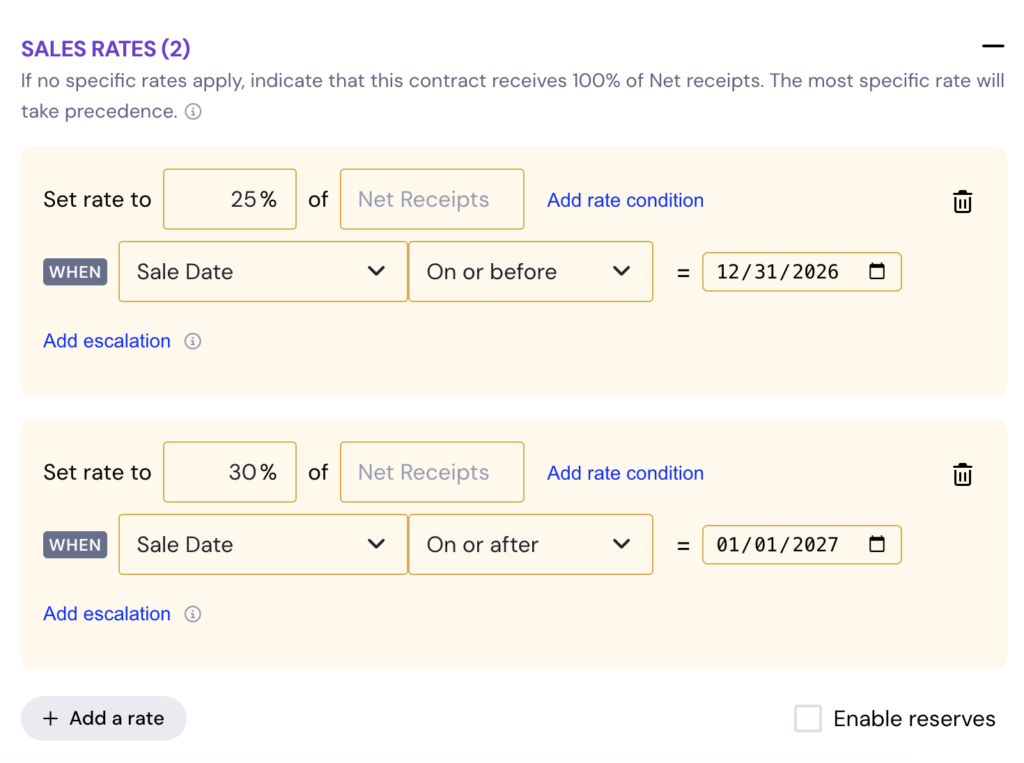
Deals change over time: a rate that steps up after a set date, an introductory rate for the first year, new terms from a renegotiation. Until now a rate in Tone applied to every sale, so dated deals needed workarounds.
Now sales, deduction, and mechanical rates can carry a date condition. In the contract’s rate builder, choose Add rate condition, then Sale Date or Report Date, and set it to On or after, On or before or Within range. Cost rates get start and end dates. When a dated rate and a general one both match a sale, the dated rate wins.
Tone warns you if two dated rates overlap. And in the contract simulator you can now give each test sale a sale date and report date, so you can check the rate switches when you expect before you run a period.
Did you know?
Sales Explorer can show you which sales will reach a statement. Open Filters and use the Type of data section to switch between Mapped sales, which match a track in your catalog and can be processed for royalties, and Unmapped sales, which won’t be. Picking one also brings up the filters that only make sense for that kind of sale.
Tip: Before you close a period, filter to Unmapped and look for big earners that still need a catalog match or an alias.
Use Tone like the Tone Team

“It’s pretty common for a team member or client to ask why something was configured a certain way, especially if the contract was set up months ago. Being able to pull up the history and see exactly what changed, when it happened, and who made the change makes those questions really easy to answer.”
– Kaitlyn Russell, Manager of Royalty Services
Other highlights
Features we added:
- A Statement notes field on contracts, printed on that payee’s new statements
- A Size column and bulk download on the Import page
- The number of ignored rows now shows at the top of a sales file’s cleaned data, so it’s harder to miss rows you’ve set aside
Features we changed:
- Statement costs are now grouped by type (recording, marketing and so on), with each cost listed under its heading
- The header row stays pinned at the top of a sales file’s Original data
Bugs we fixed:
- For publishers: ISWC, work identifier and Tunecode were blank in statement sales downloads and the unreported sales file
- The Status column in Library sheets showing blank instead of In use, In review or Draft
- Templates created by autosave losing the header and first rows of data
- Sales Explorer showing a total before it had finished counting